How to run a multi-streamer event without losing the schedule
Multi-streamer events are great for everyone involved — collab streams, raid trains, charity marathons, Minecraft SMP launches — guest streamers get exposure to each other's audiences, viewers get a longer event to invest in, and you get the kind of momentum a solo stream rarely produces.
They also fall apart constantly. Two streamers show up at the same time. A handoff window gets missed. Someone reads the schedule in a different timezone and starts an hour early. The Discord thread where the schedule "lives" has been edited twelve times and nobody knows which version is current.
Almost all of this comes down to one thing: there's no single source of truth for the schedule, and the people involved have all built slightly different mental models from a patchwork of DMs and pins.
This guide walks through how to run a multi-streamer event so the schedule survives contact with reality. It's biased toward what we've seen actually work — not theoretical best practice.
One thing it assumes you've already done: agreed a date. If you haven't, start there — finding a date the whole group can make, or jump straight to our free stream date finder — then come back here to run it.
Prefer to watch first? Here's a stream event being set up end-to-end:
The single-source-of-truth rule
The first rule is simple: there is exactly one place where the canonical schedule lives, and every other reference to it is a link back to that place.
That can be a published page on StreamDay, a Google Sheet, a Notion doc, or a Discord channel pin. What it can't be is "scattered across DMs and the announcement channel and a Twitch panel". The moment you have two versions, you have inconsistency, and at least one streamer is working from the stale one.
If you publish your event on StreamDay, the public event page (/e/{eventCode}) is the source of truth. Everywhere else — Discord, Twitter, the streamers' own channels — links to that URL. When a time changes, you change it in one place, and every link picks up the new version automatically.
The benefit of using a tool over a Google Doc is invalidation. A Doc has no way to tell viewers "this date moved." A live schedule page they've bookmarked just shows the new date next time they open it.
Lock the schedule before you announce
The mistake almost everyone makes the first time they run a multi-streamer event: they announce the event before the schedule is firm.
This sounds harmless. You've got the headline (Saturday + Sunday, June 14–15, 7pm ET kickoff) and the streamer list. The detailed schedule can come later, right? You can fill in who's streaming when after the announcement goes out.
In practice, this is exactly when the schedule starts breaking. Streamers commit based on rough times that nobody wrote down. People rearrange around assumptions that turn out to be wrong. You announce on Tuesday, three streamers update their availability on Wednesday, and now the schedule you're building Thursday doesn't match what you announced.
The fix: lock the schedule first, then announce. Treat the announcement as a publish event. Once it's out, schedule changes get expensive (every streamer has to re-promote, every viewer has to be told the dates moved).
A working approach:
- Confirm everyone in writing with their actual available windows in their actual timezone. Not "I can do Saturday evening" — instead, "I'm available Saturday June 14th, 6pm–10pm Pacific."
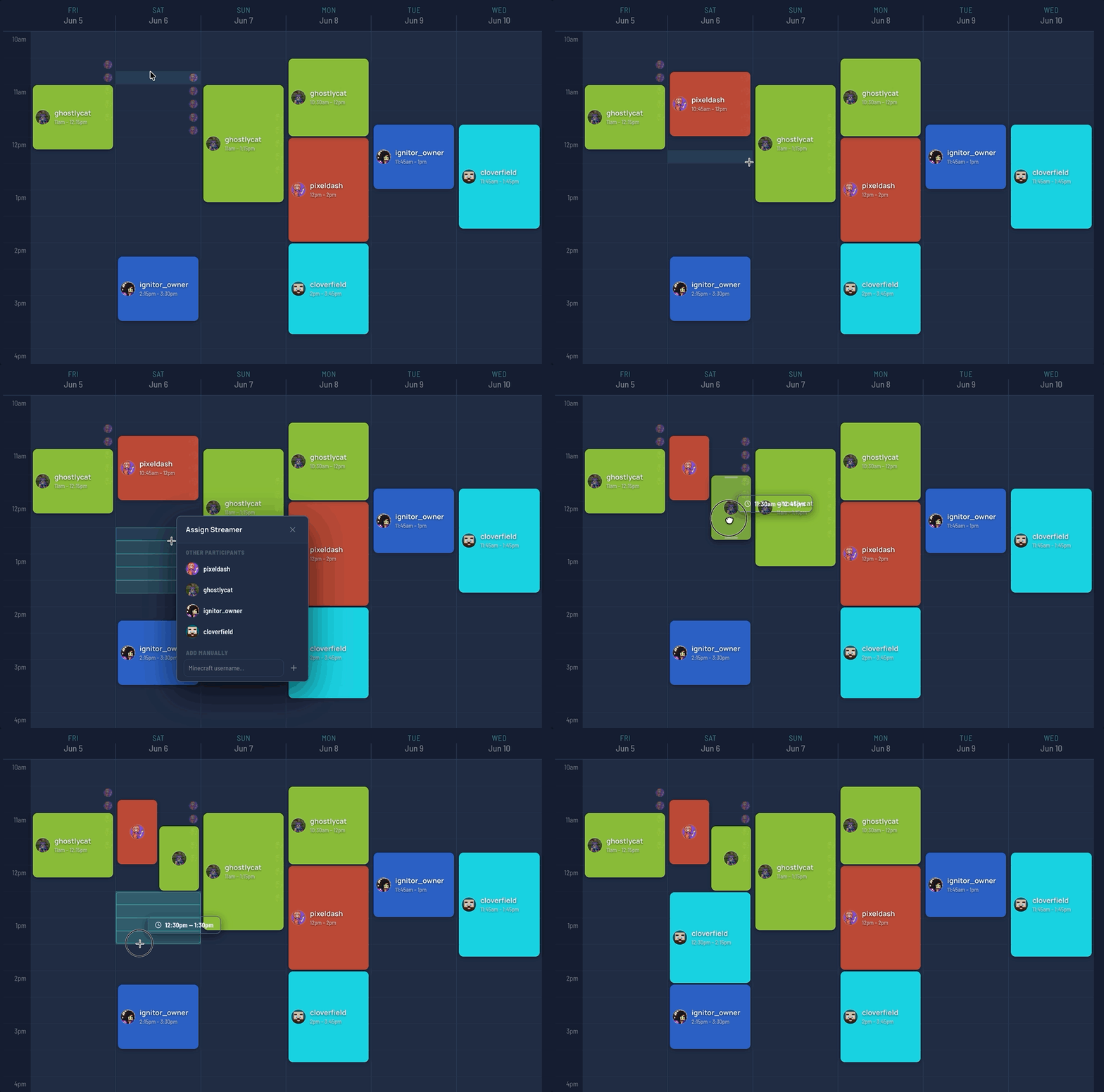
- Build the schedule with all those windows in front of you, in one place.
- Send the draft back to every participating streamer for confirmation. Wait for explicit yeses.
- Then announce, with the locked schedule attached.
This usually delays the announcement by 48–72 hours versus the "announce now, fill in later" approach. It costs you 0 hours of schedule re-negotiation afterwards.
Timezones will bite you if you let them
The single biggest source of multi-streamer-event chaos is timezone mistakes. Specifically: someone writing "7pm" on a schedule and not realising that means seven different things to seven different streamers.
Three rules that prevent almost all of these:
Pick one canonical timezone for the event, and use it consistently. Usually this is the timezone of the streamer most viewers will be watching from — if your event is mostly North American audiences, pick ET. If it's international with no clear majority, pick UTC. Whatever you pick, every schedule reference uses that timezone, with the abbreviation explicit ("7:00 PM ET", not "7 PM").
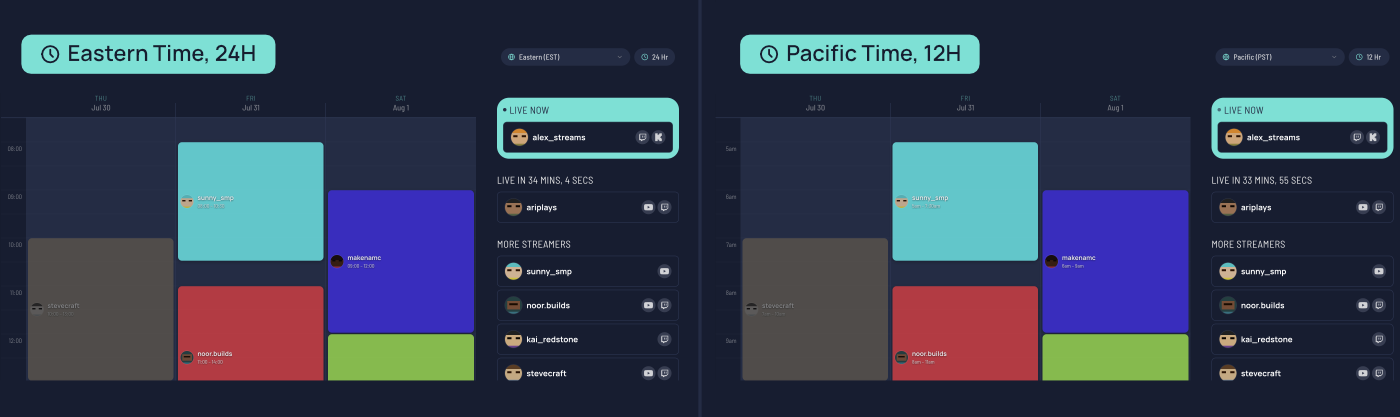
Show the schedule in the viewer's timezone, not yours. If you're using a static document, you can't do this — you're stuck with the canonical time and a note telling viewers to convert. If you're using a live tool like StreamDay's event page, the schedule re-renders in each viewer's local timezone automatically. This is the single biggest reason to use a real tool instead of a Google Doc.
Confirm each streamer's start time in their local timezone, not yours. When you send the locked schedule for confirmation, send each streamer their own block translated to their local time. "Steve — you're on Saturday 8:00 PM your time (Pacific), 11:00 PM event time (Eastern)." This catches the off-by-three-hour mistakes before they hit the announcement. Our free stream timezone converter turns a single go-live time into every region at once, so you can paste the right local time to each streamer.
Build the schedule with handoff windows, not back-to-back blocks
A common mistake: putting streamers back-to-back with the assumption that the previous streamer ends exactly when the next one begins. In a 4-hour event with 4 streamers, that's 1-hour blocks ending at the top of each hour.
This never holds up. Streams run long. Streamers go to grab a glass of water at the 55-minute mark and come back at the 58. A guest streamer starts at the top of the hour, can't see the previous streamer because they're not getting raided properly, and the first ten minutes are dead air.
Build the handoff into the schedule itself. Two patterns work:
Overlap windows. Schedule each streamer to overlap the previous one by 5–10 minutes. The previous streamer raids into the next at the overlap point. Both streams are live during the handoff so there's no gap in the event.
Buffer gaps. Schedule a 5-minute gap between each block. Use a transition graphic / "starting soon" screen during the gap. Simpler to manage than overlaps, but you get visible "dead air" that some viewers will bounce on.
Either is fine. Pick one and apply it consistently across the whole event. The thing to avoid is the implicit assumption that handoffs "just happen" with no buffer.
If you're using StreamDay's event page, blocks can overlap or have gaps without any extra logic — the schedule grid renders both correctly. The thing to remember when building blocks: the end time of one block and the start time of the next can be the same (back-to-back), can have a gap, or can overlap.
One link, shared everywhere
Once the schedule is locked, the goal is to make sure every viewer who hears about the event ends up at the same place: your event page.
That means:
- One link in every announcement. Twitter, Discord, the streamers' Twitch panels, the event's promo graphic. Every reference points to the same URL.
- Make the link memorable. "streamday.gg/e/{eventCode}" is fine, but a custom domain or a Linktree alias that resolves to the page is better if you have one. You'll be saying this URL on stream, in chat, in DMs.
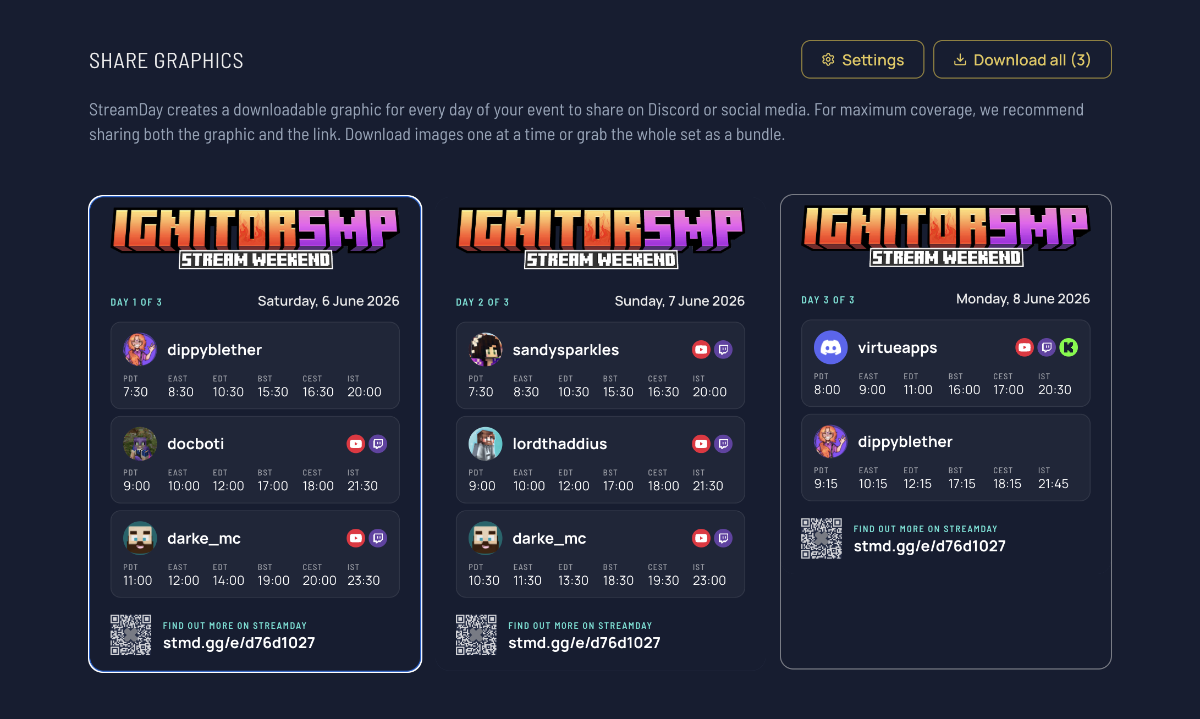
- Generate share graphics for each day. A static schedule graphic that shows times for each timezone gets reposted into Discord servers and onto Twitter the day before. It's the single most-shared asset you'll produce.
StreamDay generates per-day share graphics automatically once you've configured which timezones you want represented. The default cluster is North America (PT, ET), Europe (UK), and Asia (Japan) which covers ~90% of international audiences. You can override the list per event if your audience skews differently. Not on StreamDay yet? Our free stream lineup graphic maker lets you build the same kind of per-timezone lineup graphic by hand and download it as an image.
What to do the day of
The schedule is locked, announced, and in the hands of every participating streamer. The day arrives. What do you actually need to do?
Three responsibilities, in order of importance:
Watch the handoffs. Every transition between streamers is the single highest-risk moment. Have someone (usually the event organiser) in the chat of each handoff, ready to message the incoming streamer if the outgoing streamer is running long, or to message the outgoing streamer if the incoming one isn't ready yet.
Update the schedule if things shift. If a streamer cancels at the last minute or a block runs significantly long, the schedule page is the place to update first — before you announce in chat. Viewers refreshing the event page should see the current state.
Keep the chat focused. Multi-streamer events generate a lot of cross-chat traffic — viewers wanting to know what's next, who's coming on later, where to find a streamer's main channel. Pin the event link. Have a "what's next" auto-message every 10–15 minutes via your bot. Make the schedule retrievable without anyone having to ask.
Archive the event when it's done
The temptation after a successful event is to leave the page up indefinitely. Don't.
Once the event is over, archive the page or update it to a clear "this event has ended" state. The reasons:
- New viewers landing on the URL via old social posts shouldn't think the event is upcoming
- Search engines that have indexed the page need to know it's archived (otherwise it stays in results as a "live event")
- Your event history is useful for planning the next one
On StreamDay, the event page automatically shows a "This event has ended" state once the last day's end time has passed. You don't need to manually archive — but you do need to make sure your end time on each day is realistic, not optimistic.
What's actually different about doing this in StreamDay vs a spreadsheet
You can run a multi-streamer event with a Google Sheet. People do, all the time. What you give up:
- Timezone auto-conversion for viewers (in a sheet, you're stuck with one canonical timezone)
- Live status updates ("live now", "up next") that need wall-clock time awareness
- Share graphics that bake the schedule into a shareable image
- A canonical URL that survives schedule edits
- Real-time updates that flow through to anyone with the page open
If your event is small enough (one day, three streamers, all in the same timezone), a spreadsheet is fine. Once you have multiple days, multiple timezones, and a public audience, the per-viewer-timezone display alone justifies a real tool.
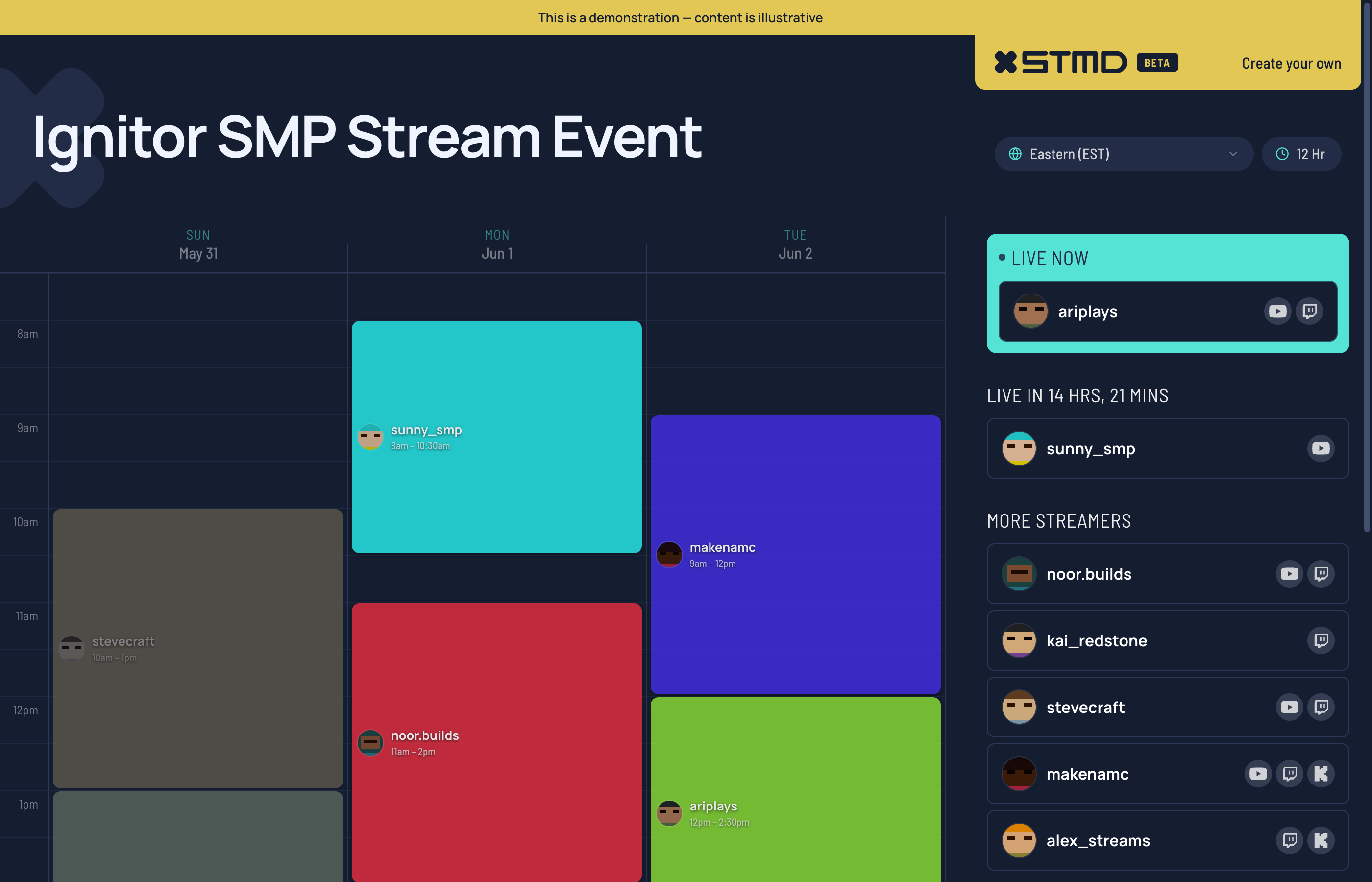
If you want to see what one looks like, our event demo page is a worked example with seven streamers across three days and a per-timezone share graphic. It's the same template every published event renders from.
What to do next
If you're organising a multi-streamer event, the three things to put in place before you announce:
- Confirm every streamer's availability in writing, in their local timezone
- Build the locked schedule in one place
- Get the public URL ready, then announce
Then you can focus your energy on the parts that actually need creative attention — promotion, branding, the streams themselves — and stop spending it on "wait, what time is so-and-so on?"
If you'd like to use StreamDay for your next event, you can create an account and have a published event page live within an hour. The free tier covers the schedule build and previews; you only pay when you're ready to publish.